Projects

A few things I've built, not just led.

Three small, working systems: a fast decision engine applied to everyday judgment calls, a live look at the device-intelligence stack running on this site, and the same decision engine turned on job postings. All illustrative or self-reported. Open any "Try it" bar to use the demos.

Demos call Jev in real time. If a live run is unavailable or rate-limited, the results captured Sep 26, 2026 are shown instead, and the caption says so.

Screenshot: Jev Decision EngineProject 01

Jev Decision Engine: fast, explainable AI decisions for everyday choices

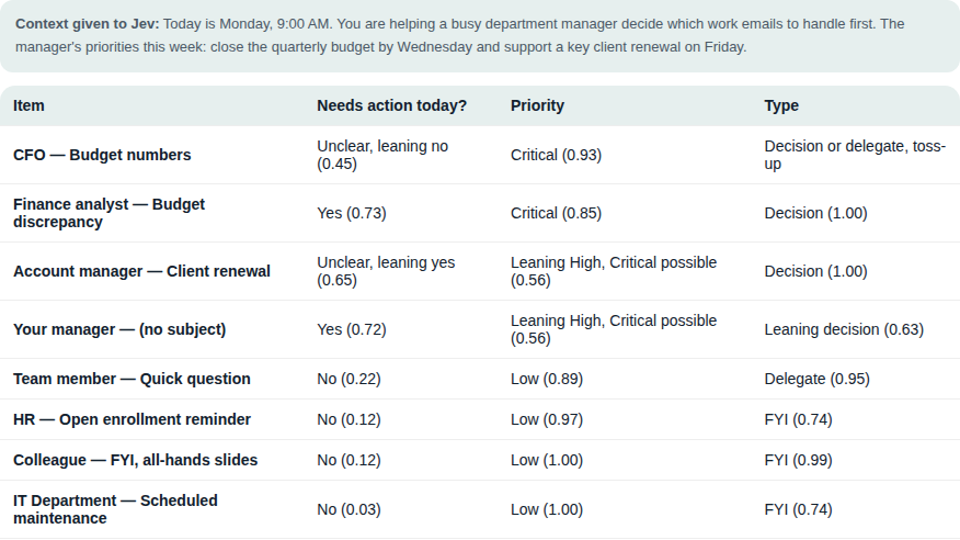
I built a two-model decision system. Jev, a small, fast decision model from TypeSafe, reads a short question and some context and answers yes/no, pick-one, or rating questions with a calibrated probability in under a second, for a fraction of a cent. Claude sits on top: it frames the questions, checks the answers Jev is least sure about, and explains the results in plain language.

Right-sized model

A single yes/no or pick-one question doesn't need a large, expensive model. It needs a fast, calibrated one.

Confidence built in

Every answer carries a confidence level, so a person only reviews the cases Jev is unsure about, the same pattern used in fraud and risk decisioning.

Measured, not assumed

Tested against my own real outcome data: asking the right question mattered more than which model answered it. About 1,000 decisions cost roughly nine cents.
Try itThree live demos: inbox triage, scam texts, account risk routingRun each one through Jev: under a second each, for a fraction of a cent.
Screenshot: Visitor Device IntelligenceProject 02

Visitor Device Intelligence: what a fraud-grade signal stack sees about your visit

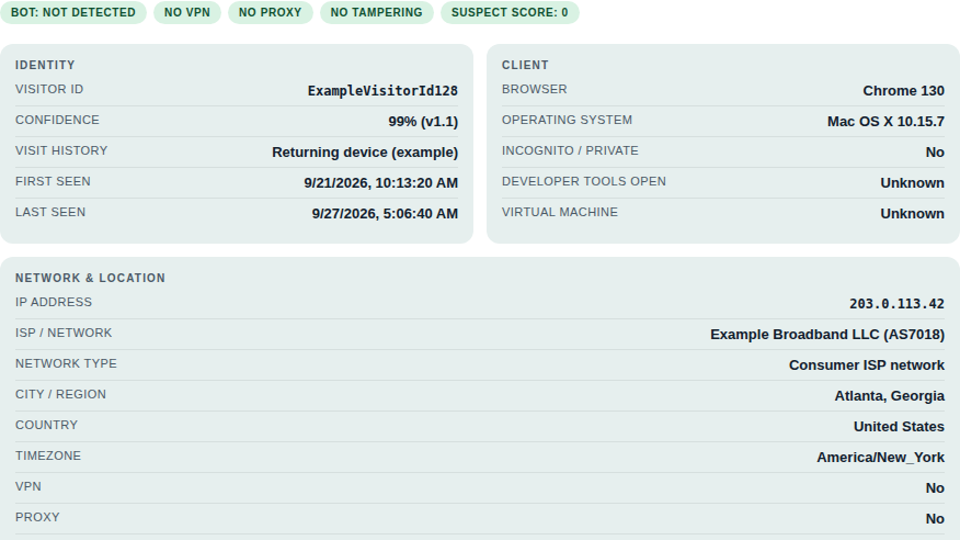
This site already runs a device-intelligence and analytics stack in the background: Fingerprint and Thumbmark (two independent vendors, shown side by side below) for device and bot detection, Microsoft Clarity for session replay, and Google Analytics for traffic. One panel exposes a slice of it, live: click the button and it shows you the read-out about your own current visit, the way a bank or lender's risk system would see it.

Real signal categories

The categories used in identity and fraud risk decisioning at scale, demonstrated on one real visit instead of a synthetic one.

Nothing hidden

The same analytics already disclosed in the site's privacy note, shown to you instead of only to me.

No decision is made

It's a read-out, not a score used to grant, deny, or flag anything.

Try itRun a check on your own deviceOne click shows what a signal stack can read about your current visit.

Check what this visit looks like from the other side. This reads: identity confidence, incognito, bot, VPN, proxy and tampering signals, your IP address, ISP, city and country, and the analytics identifiers already set by this site, plus the full raw payload if you want to see it.

Live check of your own current visit. Uses the same signals already active on this site (see the Privacy note in the footer). Nothing here is used to grant, deny, or score anything, and results are shown only to you.

Try itStack Landscape: a nested build, mapped across the webA Chrome extension I built that maps which fraud and bot-detection vendors run on the sites I browse.

The live check shows what one signal stack sees about one visit to this one site. I also built a Chrome extension that runs the same kind of client-side detection passively on every site I browse, recognizing anti-bot, fraud-risk and device-intelligence vendors by their script domains, cookie names and global JS objects, then rolling the sightings up into a category-level view. No site names or URLs are ever stored in the rollup, only vendor and category aggregates.

Seen in the wild

Same signal categories as the panel above, across hundreds of real production sites instead of just one.

Concentrated at the gate

The harder tools concentrate at login, signup, checkout and password reset, where the stakes are highest.

Privacy by design

It detects vendors, not sites: no hostname or URL ever leaves the local rollup.

Stack Landscape: the full map

An interactive bubble chart of every vendor detected, grouped by category, with the most common layered pairings.

731sites
42vendors
5categories
Open the full map →
Every vendor the extension recognizes, by name

Each count is the number of sites the vendor was detected on. Tap a category to open it.

Real data from my own browsing, not a synthetic demo.

Screenshot: Job Fit AnalyzerProject 03

Job Fit Analyzer: the same engine, aimed at a job search

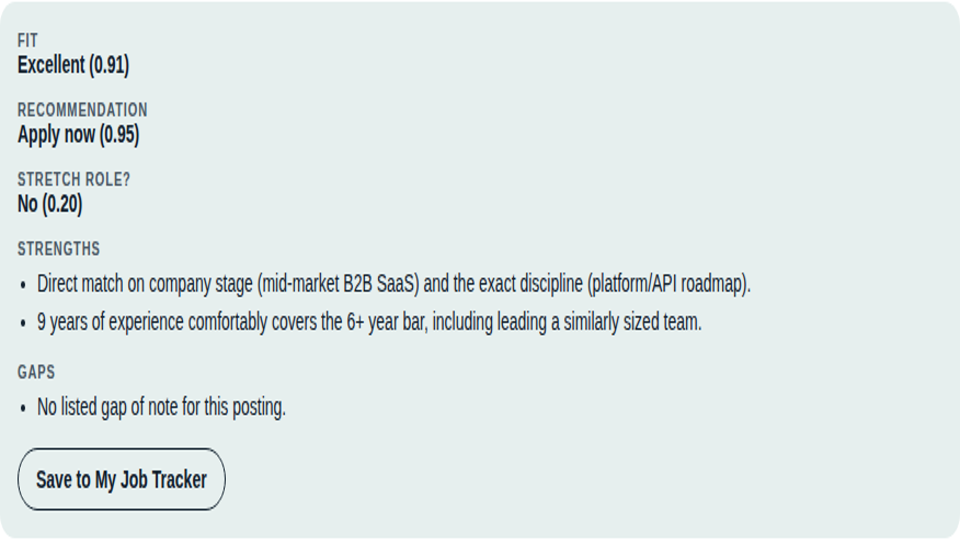
The same scoring engine as the demos above, pointed at a different problem: how well a candidate's background matches a job posting. Pick one of three postings and it runs a fictional candidate persona against it, then shows a plain-language fit analysis the way the real tool does for actual applications.

Same three questions

Asked the same way for every posting, so results are comparable across a whole search instead of ad hoc.

Ranked, not a wall

A plain fit score and a one-line recommendation turn a wall of postings into a short list.

Snapshot for the demo

The dashboard below is hardcoded; the real version is wired to a live tracking spreadsheet.

Try itPick a posting, run its candidate against itA Jev fit analysis on three fictional job postings.

Illustrative demo with a fictional candidate persona, fictional companies and fictional postings.

Try itBrowse the dashboard: 14 applications in progressA hardcoded snapshot of the real tracker's daily view. Click a role or a company to open it.

Select a role from the list to open its full job analysis, or select a company to see everything open there.

ResumeContact